
Introduction
Managing employee expenses is an essential part of running a business. From business travel and client meetings to office purchases and employee reimbursements, organisations handle numerous expenses every month. However, when these processes depend on spreadsheets, emails and manual approvals, managing expenses can quickly become complicated.
Imagine an employee submitting a travel reimbursement claim through email, a manager approving it through WhatsApp, and the finance team recording the same expense in a spreadsheet. Now multiply this process by 50, 100 or even 500 employees.
The result? Delayed reimbursements, missing bills, duplicate entries, approval confusion and limited visibility into company spending.
This is why businesses are increasingly adopting expense management software to simplify employee claims, automate approvals and maintain better control over business expenses.
But with so many solutions available, how do you choose the right one?
The best solution is not necessarily the one with the most features. It is the one that matches your company’s expense policies, employee requirements, approval processes and future growth plans.
In this guide, we will explore the essential features, benefits and factors to consider when choosing the right employee expense management software for your business.
What Is Expense Management Software?
Expense management software is a digital solution that helps businesses record, track, manage, review and process employee-related business expenses through a centralised system.
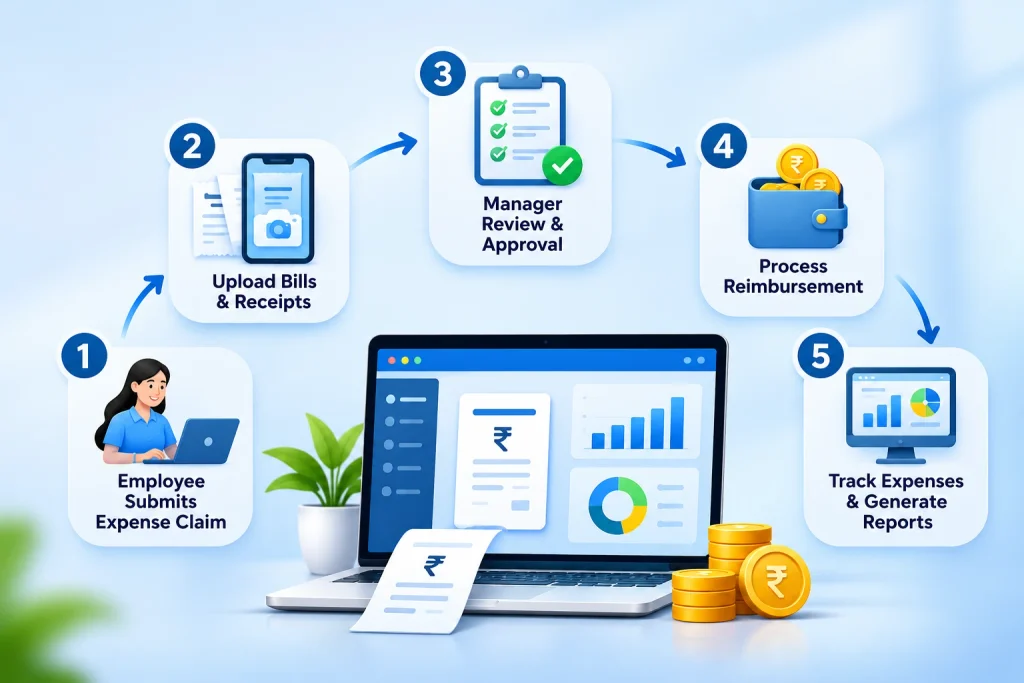
It simplifies the entire expense management process, from submitting expense claims and uploading supporting bills to reviewing approvals and processing reimbursements.
Instead of depending on spreadsheets, paperwork and multiple communication channels, businesses can manage employee expenses through a structured digital workflow.
How Does Expense Management Software Work?
A typical employee expense management process involves five important steps:
- Expense Submission: Employees submit business expense claims with relevant details and supporting documents.
- Policy Verification: The submitted expenses are checked against company expense policies.
- Approval Workflow: Claims are forwarded to the appropriate manager or authorised person for approval.
- Expense Processing: The finance or HR team reviews approved claims and processes reimbursements.
- Reporting and Tracking: Businesses maintain expense records and monitor spending through reports.
This process helps organisations maintain transparency, improve accountability and reduce repetitive administrative work.
Why Businesses Need Expense Management System?
Employee expenses may seem like small transactions individually, but managing hundreds or thousands of claims manually can consume considerable time and resources.
For example, consider a company with 150 employees. If even 50 employees submit reimbursement claims every month, the HR and finance teams must review multiple bills, verify amounts, obtain approvals and update records.
Without a proper system, this can become difficult to manage.
Here are some common challenges businesses face.
Delayed Employee Reimbursements
Employees may have to wait for several days or weeks to receive reimbursements because claims are stuck in email conversations or approval queues.
Missing Bills and Receipts
Paper receipts can be misplaced, damaged or forgotten, making expense verification difficult.
Lack of Expense Visibility
When expense information is stored across different spreadsheets, managers may struggle to understand how much each department or employee is spending.
Manual Errors
Incorrect calculations, duplicate entries and inconsistent expense categorisation can affect financial records.
Complicated Approval Processes
When multiple managers are involved, tracking pending approvals and following up with the right people can become time-consuming.
Difficulty Maintaining Expense Policies
Without a structured process, employees may submit expenses that do not follow company guidelines.
A centralised expense management system helps address these challenges by bringing employee claims, approvals, policies and reimbursement records into one organised workflow.
10 Essential Features of Expense Management Software
Before investing in any expense management solution, understand which features can make a real difference to your daily business operations.
Here are ten important capabilities to evaluate.
1. Easy Employee Expense Submission
Employees should be able to submit expense claims without complicated procedures.
Look for a system that allows employees to:
- Submit expense claims digitally.
- Enter expense amounts and descriptions.
- Select the appropriate expense category.
- Attach supporting bills or documents.
- Check the status of submitted claims.
A simple submission process encourages employees to report expenses on time.
2. Customisable Expense Categories
Every organisation has different types of business expenses.
For example:
- Travel and transportation
- Accommodation
- Food and refreshments
- Client meetings
- Fuel and vehicle expenses
- Office supplies
- Internet and communication
- Business-related purchases
Choose employee expense management software that allows administrators to configure expense categories according to company requirements.
This makes expense tracking and reporting more organised.
3. Multiple-Level Approval Workflows
Approval management is one of the most important features to consider.
Different expense claims may require approval from different people depending on the amount, department or company policy.
For example:
An employee submits a travel reimbursement request. The reporting manager reviews the claim, and the finance team verifies it before processing the reimbursement.
Look for software that supports:
- Manager-level approvals
- Multiple approval levels
- Configurable approval hierarchies
- Approval tracking
- Clear pending and approved statuses
This helps businesses establish a consistent expense approval process.
4. Expense Policy Management
Every company should have clear guidelines explaining which expenses employees can claim, what limits apply, and which statutory compliance requirements must be followed.
For example, a business may define separate travel allowances for employees based on their designation, department or location.
Your expense management software should support configurable expense restrictions and policies.
Check whether the platform allows you to manage:
- Expense categories and limits
- Department-wise restrictions
- Location-based expense policies
- Employee-specific expense rules
- Approval requirements
A well-defined expense policy helps employees understand the rules and makes expense reviews more consistent.
5. Employee Reimbursement Management
Reimbursements should not become a monthly administrative headache.
Choose employee expense management software that helps HR and finance teams track approved claims and manage reimbursement records efficiently.
Important capabilities include:
- Tracking submitted reimbursement requests
- Monitoring approval status
- Maintaining payment records
- Managing manual reimbursements
- Connecting approved expenses with payroll, where supported
A transparent reimbursement process improves employee confidence and reduces unnecessary follow-ups.
6. Mobile Accessibility
Employees do not always work from an office.
Sales representatives, field employees, consultants and travelling teams may need to submit expenses while working outside their usual workplace.
A mobile-friendly expense management system makes it easier to access expense-related services from anywhere.
Look for:
- Mobile access for employees
- Easy expense submission
- Document and bill uploads
- Approval notifications
- Claim status tracking
Mobile accessibility is particularly useful for organisations with field-based and geographically distributed teams.
7. Expense Tracking and Reporting
Businesses need more than a record of how much money has been spent.
They also need to understand where the money is going.
Expense tracking software should help businesses organise, monitor and review expenses through meaningful reports and real-time HR analytics dashboards
Useful reporting categories include:
- Employee-wise expenses
- Department-wise expenses
- Expense category breakdowns
- Monthly expense summaries
- Pending reimbursement claims
- Approved and processed claims
These insights help management review spending patterns and make informed business decisions.
8. Payroll Integration
Employee reimbursements and payroll are closely connected in many organisations.
When these processes operate separately, HR and finance teams may have to transfer approved reimbursement details manually.
An integrated solution can help connect employee expense records with payroll processing.
Before selecting a platform, check whether it supports:
- Approved expense settlement through payroll
- Reimbursement records
- Salary-related adjustments, where applicable
- Payroll reporting
- Integration with employee records
This can reduce duplicate data entry and simplify monthly payroll operations.
9. Data Security and Access Control
Expense records may contain sensitive employee and financial information.
Therefore, security should be an important part of your software evaluation.
Check whether the provider offers:
- Role-based access permissions
- Secure employee information management
- Controlled administrator access
- Approval history and audit trails
- Appropriate data protection measures
Employees, managers, HR teams and finance administrators should only have access to the information required for their responsibilities.
10. Scalability and Integration
Your expense management requirements may change as your business grows.
A company with 30 employees may initially have a simple reimbursement process. However, after expanding to 300 employees across multiple locations, it may need more advanced policies, approval structures and reporting.
Choose software that can accommodate:
- Increasing employee numbers
- Multiple departments and locations
- Changing expense policies
- Additional approval levels
- Growing reporting requirements
- Integration with payroll and HRMS
Think about your future requirements rather than choosing software based only on your current workforce size.
How to Choose the Right Expense Management Software for Your Business
Now that you understand the essential features, how should you evaluate different solutions?
Use the following practical steps before making your final decision.
Step 1: Understand Your Current Expense Management Process
Start by identifying how your organisation currently handles employee expenses.
Ask your HR and finance teams:
- How do employees submit expense claims?
- How are bills and receipts collected?
- Who approves employee expenses?
- How long does reimbursement usually take?
- How are expense records maintained?
- What problems occur frequently?
Understanding your existing process helps you identify what needs improvement.
Step 2: Define Your Business Requirements
Not every company needs the same expense management features.
A startup may need a simple claim submission and approval system, while a large organisation may require department-wise policies, multiple approval levels and detailed reporting.
Prepare a list of essential and optional features before comparing software providers.
Step 3: Check Ease of Use
A software platform should simplify employee expense management, not make it more complicated.
During a product demonstration, check whether:
- Employees can submit claims easily.
- Managers can review and approve requests.
- HR administrators can configure expense policies.
- Finance teams can access expense reports.
- Employees can track reimbursement status.
An easy-to-use system encourages adoption across the organisation.
Step 4: Evaluate Integration Capabilities
Check whether the expense management platform can connect with your existing business systems.
For example, integration with payroll can reduce manual work when processing approved employee reimbursements.
If your organisation uses an HRMS, accounting platform or ERP, discuss the available integration options with the software provider.
Step 5: Compare Pricing and Total Cost
Do not select software based only on its monthly subscription price.
Consider the complete investment, including:
- Software subscription
- Implementation charges
- Employee onboarding
- Training requirements
- Additional modules
- Integration costs
- Customer support
Choose a solution that offers the right balance of functionality, usability and cost.
Step 6: Request a Live Product Demo
A product demonstration helps you understand how the software works in real business situations.
Ask the provider to demonstrate an actual expense workflow, such as:
- An employee submitting a travel expense.
- The manager reviewing the request.
- The finance team verifying the claim.
- The reimbursement being recorded.
- The expense appearing in relevant reports.
This will help you evaluate the software beyond its marketing claims.
Key Differences – Manual vs Automated Expense Management:
Many organisations still manage employee reimbursements through spreadsheets, emails and manual documentation.
However, digital expense management offers a more structured approach.
| Comparison Factor | Manual Expense Management | Automated Expense Management |
| Expense submission | Emails and paper forms | Digital claim submission |
| Bill management | Physical bills and scattered files | Digital document records |
| Approvals | Manual follow-ups | Structured approval workflows |
| Expense policies | Manually checked | Configurable policy controls |
| Reimbursement tracking | Spreadsheet updates | Centralised claim tracking |
| Reporting | Manual calculations | Organised expense reports |
| Data management | Multiple spreadsheets | Centralised records |
| Employee experience | Frequent follow-ups | Better process visibility |
Key takeaway: Manual expense management may work for very small teams, but as employee numbers and expense volumes increase, a digital system can make the process more organised and manageable.
Benefits of Employee Expense Management Software:
Implementing the right employee expense management software can benefit employees, managers, HR teams and finance departments.
Here are some important advantages.
Saves Administrative Time
Automating repetitive tasks such as claim submission, approval routing and expense record management reduces the administrative effort required from HR and finance teams.
Improves Expense Visibility
Centralised expense records help managers understand employee spending and review business expenses more effectively.
Simplifies Employee Reimbursements
Employees can submit claims and follow their progress through a structured process rather than repeatedly contacting HR for updates.
Improves Policy Compliance
Configurable expense categories and restrictions help organisations maintain consistent expense management practices.
Reduces Manual Errors
Reducing repeated data entry and spreadsheet-based calculations can minimise common administrative mistakes.
Strengthens Accountability
A defined approval process makes it easier to identify who submitted, reviewed and approved an expense claim.
Supports Business Growth
A scalable digital system helps organisations manage increasing employee expenses without relying entirely on additional manual administrative work.
Common Mistakes to Avoid When Choosing Expense Management Software
Even after identifying the right features, businesses sometimes make mistakes when selecting a solution.
Avoid these common mistakes:
1. Choosing software based only on price
Low-cost software may not provide the approval workflows, integrations or reporting your business requires.
2. Ignoring employee experience
If submitting a claim is difficult, employees may continue using emails and informal communication channels.
3. Overlooking payroll integration
Managing employee expenses separately from payroll can create additional administrative work.
4. Not checking customisation options
Your company may have specific expense categories, reimbursement rules and approval structures. Make sure the software can accommodate them.
5. Ignoring data security
Financial and employee information must be protected through appropriate access controls and security practices.
6. Not testing the actual workflow
Always request a demonstration using real business scenarios before making a decision.
Expert Tips: What Should You Check Before Buying?
As a practical buying checklist, evaluate the following points before finalising your expense management solution.
| Evaluation Area | What You Should Check |
| Employee experience | Simple claim submission and tracking |
| Expense categories | Customisable expense heads |
| Approval management | Multiple-level approval workflows |
| Policy management | Expense restrictions and location-based policies |
| Reimbursements | Claim settlement and payment tracking |
| Mobile accessibility | Employee and manager mobile access |
| Payroll | Expense and reimbursement integration |
| Reporting | Employee-wise and department-wise reports |
| Security | Role-based access and audit records |
| Scalability | Ability to support business expansion |
| Pricing | Transparent pricing and implementation costs |
| Support | Reliable onboarding and customer assistance |
Expert recommendation: Don’t purchase expense management software simply because it offers more features. Choose a solution that addresses your organisation’s actual challenges and makes expense management easier for everyone involved.
Why Choose SkizzleHR for Employee Expense Management?
Managing employee expenses should not require multiple spreadsheets, endless email conversations and repeated follow-ups.
Businesses need a structured system that connects employee expense claims, approval workflows, reimbursement records and payroll operations.
This is where SkizzleHR can help.
SkizzleHR is an AI-powered HRMS platform designed to simplify HR operations, employee management, payroll and other essential workforce processes through its complete HRMS feature set.
Its expense management capabilities help organisations manage employee expense claims through a centralised HR platform.
Key Expense Management Capabilities in SkizzleHR
1. Custom Expense Heads
Create and manage expense categories according to your organisation’s requirements.
2. Expense Restrictions
Configure expense restrictions to help maintain better control over employee claims.
3. Location-Based Policies
Manage expense policies based on applicable employee or location requirements.
4. Multiple-Level Approvals
Establish structured approval workflows to ensure expense requests are reviewed by the appropriate authorities.
5. Employee Reimbursements
Manage employee reimbursement records and streamline the claim settlement process.
6. Payroll-Linked Expense Settlement
Connect approved expense settlements with payroll to simplify related employee payment processes.
7. Employee Self-Service
Give employees a convenient way to access HR services and manage relevant requests through the employee self-service experience.
Why Does an Integrated HRMS Matter?
Expense management does not operate independently of other HR activities.
Employee information, salary processing, attendance, approvals and reimbursements are often interconnected.
With SkizzleHR, businesses can manage multiple HR functions through one platform, helping reduce disconnected processes and improve operational visibility.
Whether you manage a startup, SME or growing enterprise, SkizzleHR helps bring essential HR and employee expense management activities into a more organised digital environment.
Ready to simplify employee expense management?
Explore SkizzleHR and discover how a connected HRMS can help your organisation manage employee expenses and everyday HR operations more efficiently.
Frequently Asked Questions (FAQs)
What is expense management software?
Expense management software is a digital platform that helps businesses record, track, review, approve and manage employee business expenses. It simplifies expense submissions, approval workflows, reimbursement tracking and reporting.
Why is employee expense management important?
Employee expense management helps businesses maintain accurate spending records, control business expenses, process reimbursements systematically and improve financial transparency.
What features should the best expense management software include?
Important features include digital expense submission, custom expense categories, approval workflows, expense restrictions, reimbursement tracking, mobile accessibility, reporting and payroll integration.
How does employee expense management software help HR teams?
It helps HR teams organise employee claims, manage approval processes, maintain reimbursement records and reduce repetitive administrative tasks.
Can expense management software handle employee reimbursements?
Yes. Many expense management platforms allow employees to submit reimbursement claims, attach supporting documents, track approval status and maintain reimbursement records. The available settlement methods depend on the software.
Is expense management software suitable for small businesses?
Yes. Small businesses can use expense management software to organise employee claims, establish expense policies and maintain accurate reimbursement records as their workforce grows.
How does expense management software improve business efficiency?
It reduces manual data entry, simplifies approval workflows, centralises expense records and provides better visibility into employee-related business spending.
What is the difference between expense tracking software and expense management software?
Expense tracking software primarily focuses on recording and monitoring expenses. Expense management software generally covers a broader process, including expense submission, policy management, approvals, reimbursements and reporting.
Conclusion
Choosing the right expense management software is an important step towards building a more organised and efficient business.
As organisations grow, managing employee expenses through spreadsheets, emails and manual approvals can become increasingly difficult. A digital expense management system helps simplify claim submissions, establish approval workflows, improve reimbursement tracking and provide better visibility into business spending.
Before selecting a solution, evaluate its essential features, customisation options, mobile accessibility, payroll integration, reporting capabilities, security and scalability.
Most importantly, choose software that works for your employees, managers, HR team and finance department.
With SkizzleHR, businesses can bring employee expense management together with essential HR and payroll operations through one integrated platform.
Simplify your HR operations. Improve expense visibility. Manage your workforce smarter with SkizzleHR.